This document provides a brief overview of the new functionality in OfficePlace Group Calendar version 2026-8. For more detailed information, please refer to the user guide.
In this release, we have focused on improving the user experience, introducing support for manually choosing colors for other users’ calendars and quickly unselecting calendars from the calendar header.
The following topics are covered in this release:
- Quickly unselect calendars from the calendar header
- Choose colors for other users’ calendars
Quickly unselect calendars from the calendar header
When several calendars are displayed, users can now unselect a calendar directly from its header. Click the X icon next to the calendar name, identified by the Unselect calendar tooltip, to remove that calendar from the current view.
This performs the same action as clearing the corresponding checkbox in the calendar list on the left. The calendar is removed from the view immediately, and its checkbox is updated accordingly. This makes it easier to adjust the displayed calendars without returning to the calendar list.
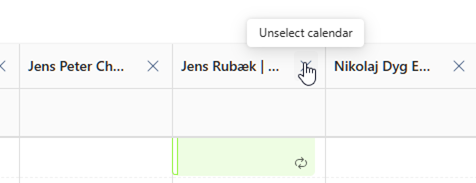
Fig: Use the Unselect calendar icon to remove a calendar from the current view.
Choose colors for other users’ calendars
In previous versions, Group Calendar automatically assigned a color to each user. Users can now choose their own preferred colors for other users’ calendars instead. This makes it possible to give one or more people a distinctive color - for example, to make the calendars of colleagues who need extra attention easier to spot.
To change a calendar’s color, right-click the user in the calendar list and select Color. Choose a color from the palette or select Custom to define a specific color. Select Automatic to use a system-assigned color.
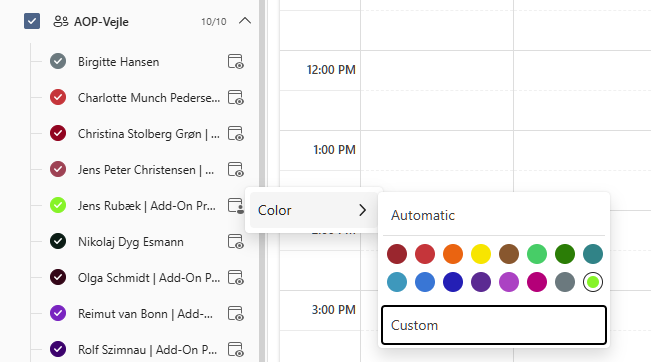
Choose a calendar color from the Color menu in the calendar list.
Was this article helpful?
That’s Great!
Thank you for your feedback
Sorry! We couldn't be helpful
Thank you for your feedback
Feedback sent
We appreciate your effort and will try to fix the article