This article describes an ongoing issue seen by customers using Realtime Service with Exchange Online, where change notifications no longer appear in the product.
Background
Realtime Service (RTS) is responsible for delivering meeting data to Resource Central, and achieves this by keeping a subscription to resource mailbox calendars in Exchange. The subscription is created in Exchange Web Services (EWS), where RTS specifies an IP and a port where EWS must deliver the change notifications. When the subscription is active EWS will send a heartbeat TCP package every 30 seconds, and when these are received RTS will list the mailbox connection as healthy in the status list (green checkmark). If a heartbeat is not received within 120 seconds (meaning four heartbeats have been missing) then RTS will assume the subscription has expired and will re-subscribe.
Problem description
We suddenly see cases where RTS no longer receive notifications for the majority of the resources, and the first thing to do in this scenario would be to inspect public firewall logs. Typically, you would see this behavior if the firewall opening created for port 10002 traffic has a source filter whitelisting specific public Microsoft IP addresses. If somehow this list had not been aligned with currently used Microsoft IP addresses certain traffic would be blocked. In this scenario there is no signs of any blocked traffic, which would indicate that the notification TCP packages are either not sent from EWS or do not reach the customer public firewall.
Observations from our troubleshooting
Since this problem popped up the first time we have tried a number of things to troubleshoot this, and found that we can make the notifications work in the following scenarios:
- Place RTS on a VM inside Azure network, where notifications on port 10002 works fine.
This test was done with a customer where notifications worked flawless in the Azure Virtual Machine while failing in the customer setup. - Change the notification port to 443.
When this change is made the notifications starts to hit the public firewall fairly quickly, but getting these to RTS is another question - which we will address below.
Cause unclear
The observations do not clearly explain what is happening, but it would seem that some security measure in Microsoft network blocks certain traffic depending on destination and port. There is no indication that the subscription does not get created, and so we must also assume that the notifications at the source are working. Only conclusion can be that something between source and destination results in the loss of this traffic.
Workaround
In the following I will focus on the second observation above, since you can implement some technical steps in your environment make use of that. When the notification port is changed to 443 it means that Microsoft will start sending TLS encrypted HTTPS traffic, which cannot be directly received by RTS. Changing the port is done with this setting:
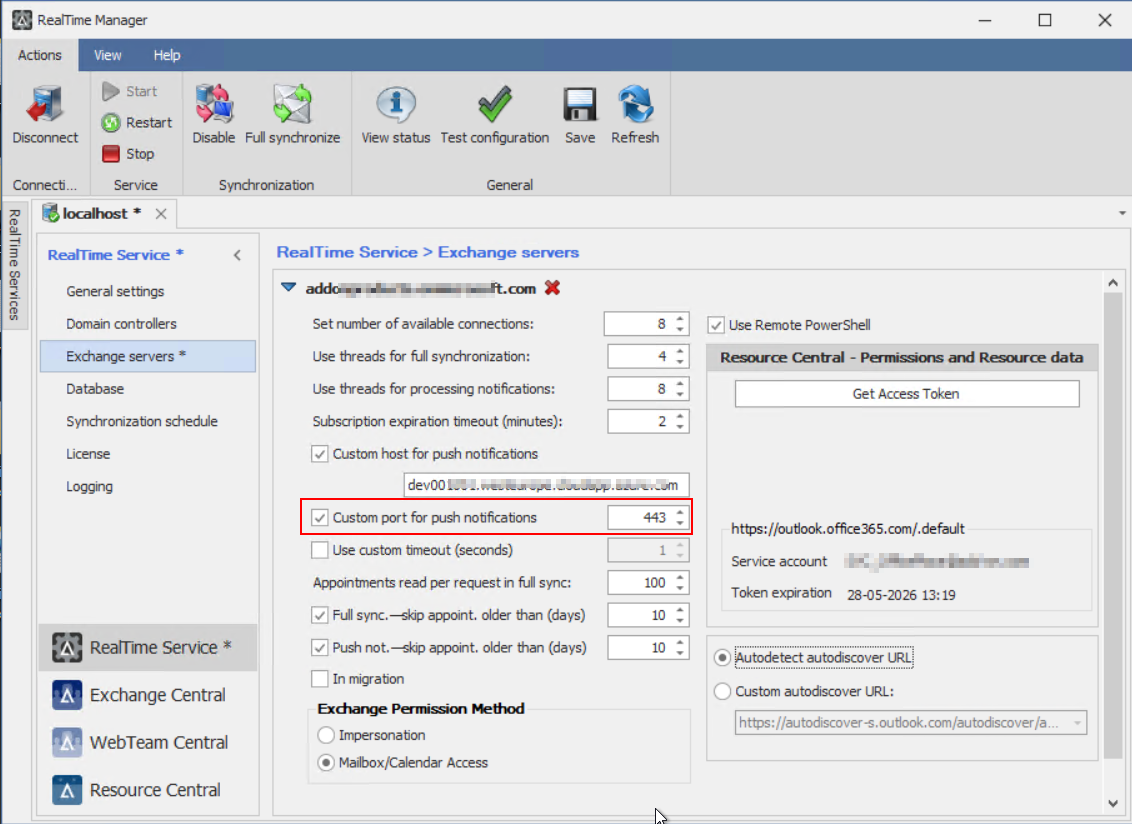
While it is possible to change the receiver port in RTS, you cannot make it work with encrypted traffic. The solution is to implement an intermediate step that can take the incoming HTTPS traffic and remove the TLS encryption and move it to port 10002 so that RTS can receive it. There are different ways to achieve this as you can see below.
Firewall appliance
Your public firewall has a rule that allows the incoming traffic from EWS, and you must find a way to isolate that traffic from other potential https traffic if you have web sites published. This can be done with DNS or otherwise. Next your firewall must be able to do port translation of that traffic and in the process be able to decrypt the traffic.
Cloudflare solution provided by Add-On Products
We have established a set of rules in Cloudflare that does the exact trick described in the initial explanation of the workaround above. To make it work we need to get your public IP and will then create a custom DNS registration that specifically handles your notification traffic. To implement this in your RTS you must contact our support and provide us with your public IP used currently by RTS, and we will then get back to you with a DNS name you must implement in RTS as follows:
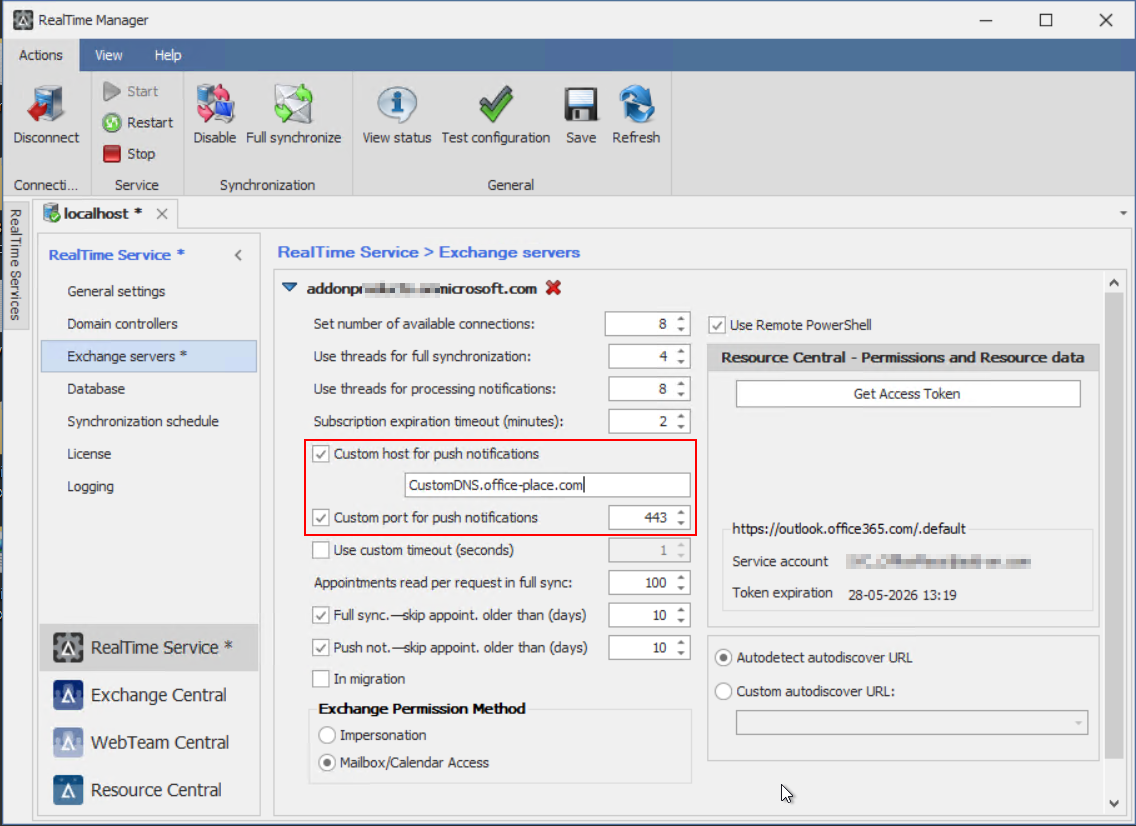
Once you have entered the new information you must save and then restart RTS service.
NOTE!
With this change notification traffic will be transported through Cloudflare network, and this means your firewall will see a new and different source of this traffic. If you use Microsoft's lists to filter this inbound traffic, then the notifications will now be blocked by your firewall. We cannot give you a specific IP as source for this traffic, but you might be able to use Cloudflare ASN13335.
Future solution
We can only surmise that these problems are somehow related to the future deprecation of EWS from Microsoft, so we urge you to look into switching to our new OfficePlace offering. With OfficePlace Connect we use Microsoft Graph, and as this is a hosted solution we monitor and maintain the solution and work constantly to handle changes in Microsoft technologies to ensure stable Resource Central operations.
Was this article helpful?
That’s Great!
Thank you for your feedback
Sorry! We couldn't be helpful
Thank you for your feedback
Feedback sent
We appreciate your effort and will try to fix the article